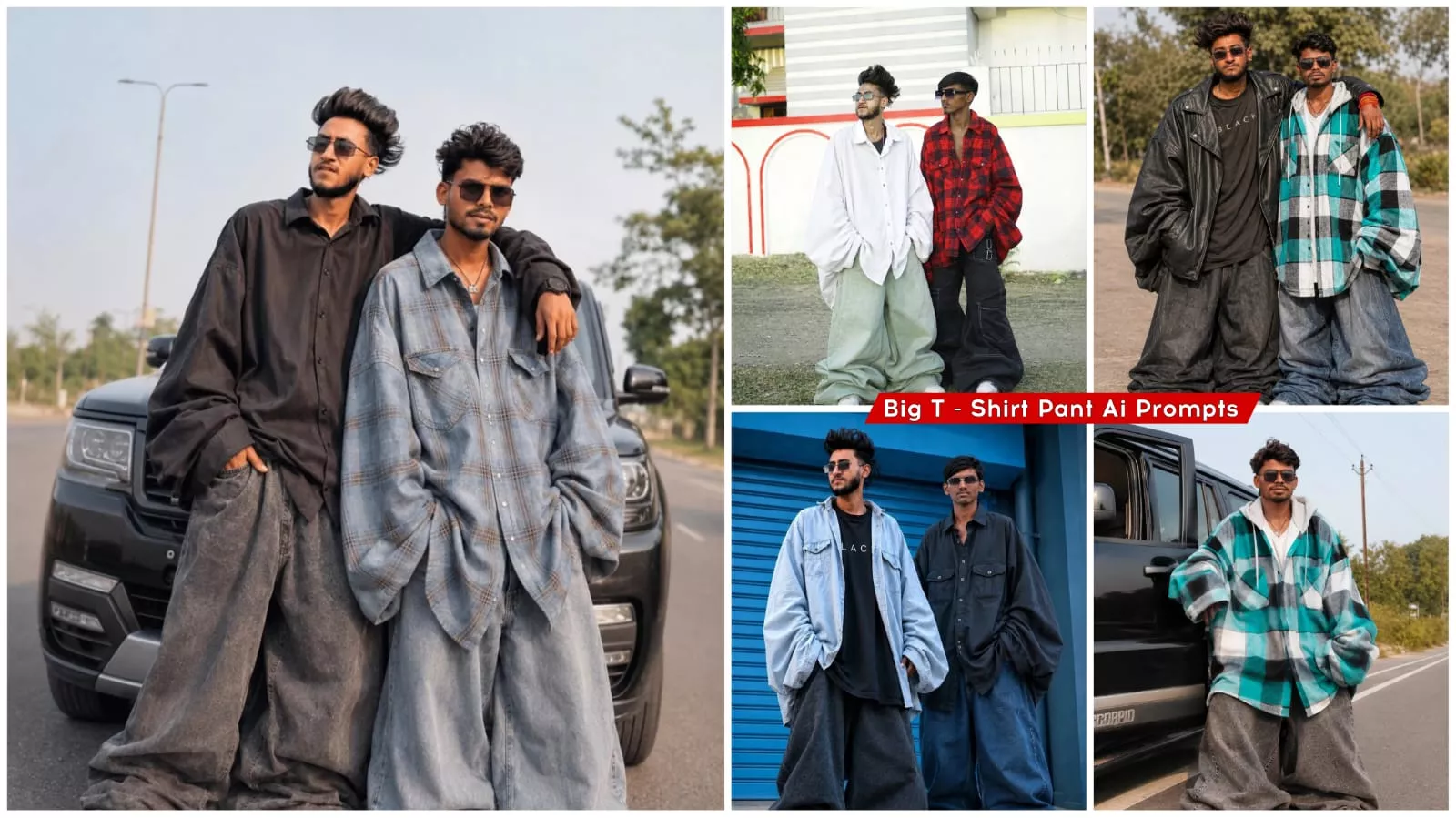
Funny Big T- Shirt Pant Ai Photo Editing Prompts – Friends, today I am going to introduce you to a specific type of content—specifically, a photo editing technique. As you are all likely aware, photo editing has become incredibly popular these days. The particular trend I am about to share with you is currently going viral; it is a photo editing style that has gained immense traction—the “oversized T-shirt and baggy pants” trend. In this article, we will explore exactly what this trending editing style entails, how it is executed, and which tools allow us to create it with ease. Many people are already going viral by creating photos using this technique, and by following along, you too can achieve viral status quite easily. So, simply keep following the step-by-step instructions I am about to provide.
Details Of Big T- Shirt Pant
Friends, let’s now explore exactly what this “photo editing” phenomenon is—specifically the images we are currently creating—and why it is going so incredibly viral. Let me explain: these particular photos, featuring oversized shirts and trousers, resemble funny memes—or simply humorous images, if you prefer. They often evoke a futuristic aesthetic, perhaps reminiscent of the year 2030 or 2050. These images are so amusing that upon seeing them, people instantly burst into laughter, eagerly share them with others, and leave a multitude of comments. Commenting plays a crucial role in boosting a video’s reach; whenever a video garners a high volume of comments, its overall reach and visibility automatically increase, as the engagement generated by comments drives up the view count. Furthermore, the comments themselves typically consist of laughing emojis or other humorous reactions, and people are actively sharing these funny memes with their networks—all of which contributes to their rapid virality. Consequently, everyone is currently creating these images, and the trend has surged in popularity recently. If you decide to create one of these photos yourself, it won’t take long for your image to go viral as well—in fact, it could spread across the web very quickly!
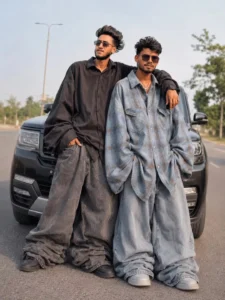
Use my uploaded photo as the main subject and automatically transform the existing clothes into an EXTREME oversized “jhula dhala/baggy fashion” outfit while keeping the same clothing style and color theme from the original image. The Al must NOT require any separate outfit reference image. Only use the clothes alread ady photo and visible visible in i the uploaded ph convert them into a MASSIVEL OVERSIZED version. Transformation rules: make the shirt/hoodie/t-shirt 4X-GX bigger than the body make sleeves extremely wide, puffy, and hanging for below the hands make pants ultra wide, extra thick, balloon-style, and heavily oversized add huge fabric volume and dramatic loose folds outfit should look very f BULKY, and DROOPY look very FAT, pants should become extremely baggy and stacked near the feet clothes must look heavy, soft, hanging, and naturally folded preserve original clothing colors and fashion vibe preserve the person’s real face, hairstyle, pose, body angle, and background realistic cloth physics and shadows oversized proportions should dominate the entire image trendy Tik Tok oversized fashion aesthetic cinematic DSLR portrait look shallow depth of field ultra realistic high-detail fabric texture IMPORTANT: The clothes must become MUCH WIDER and THICKER, not just longer. Focus on massive width, volume, puffiness, and exaggerated loose shape. The outfit should look absurdly oversized but still realistic. Do NOT create normal baggy9 clothes
Requirement & Tool App
Friends, let me tell you exactly what resources you will need to create this style of photo edit—and how, by combining these elements, you can transform your photo into something truly spectacular. So, let’s dive right in. The primary tool or application required for this task is ChatGPT—an incredibly famous and widely renowned app for generating images. This is precisely how everyone is creating these edits; in fact, all the viral images you see circulating online were generated using this very tool. It has become a massive trend, with people across the globe—including on platforms like Google—busily creating their own unique photos. Now that I’ve revealed which application to use and how to create these images with ease—ensuring your photos turn out looking fantastic—I will also share, right here in this post, the details on how to make them go viral. So, please read this article carefully; you will only be able to fully grasp the process—and subsequently create your own images with ease—if you pay close attention to every detail.
How To Create Image
Now, let’s finally learn how to create this specific photo edit. We will explore the exact process—editing and generating your image in a way that ensures excellent results, maintains HD quality, and requires minimal effort. To achieve this, the very first step is to upload a clean, clear photograph. You must select a sharp, distinct image of yourself; only then will the resulting photo edit turn out well. Once you have uploaded the photo, simply copy the specific prompt I have provided on my website, paste it into the designated area, and hit “Generate.” The result will be a beautifully crafted, ready-to-use photo edit. To perform this editing task, we will open ChatGPT, upload a clear photograph—specifically one where your face and features are clearly visible—and then paste the prompt to generate the image. The final result you receive will be truly stunning and sure to captivate everyone.