Normal To 4k High Quality Photo Editing Prompts – Google Gemini Prompts – Do you have old photos, or perhaps images that are very blurry? Or maybe you have a photo—such as a selfie—that turned out blurry, but you don’t want to delete it; instead, you wish to convert it into HD 4K quality, yet you aren’t sure how to go about it? Today, I am going to address this very topic and explain exactly how you can achieve this. If you are interested in learning more, please read this paragraph carefully, as I will guide you through the process of restoring your blurry or old photos—or upgrading them to 4K resolution—with the help of a simple tool. So, let’s get started!
Why This Photo Go To Viral?
So, why does this particular type of photo garner such an immense number of views? Let’s find out. The appeal lies in the fact that it allows you to restore your regular or old photographs. This is achieved through the use of specific “prompts.” Because these prompts are the key to generating such images, people go crazy searching for them in an effort to create their own photos; however, they often lack the proper guidance on where to locate them. You can find these very prompts right here on our website, where a comprehensive collection of prompts is available for you to access and utilize. Furthermore, creating these photos requires very little effort—I have outlined the necessary steps below. It is incredibly gratifying to have an old photograph restored or to have a blurry image transformed into high-definition (HD) quality; this is precisely why this type of photo goes so incredibly viral.
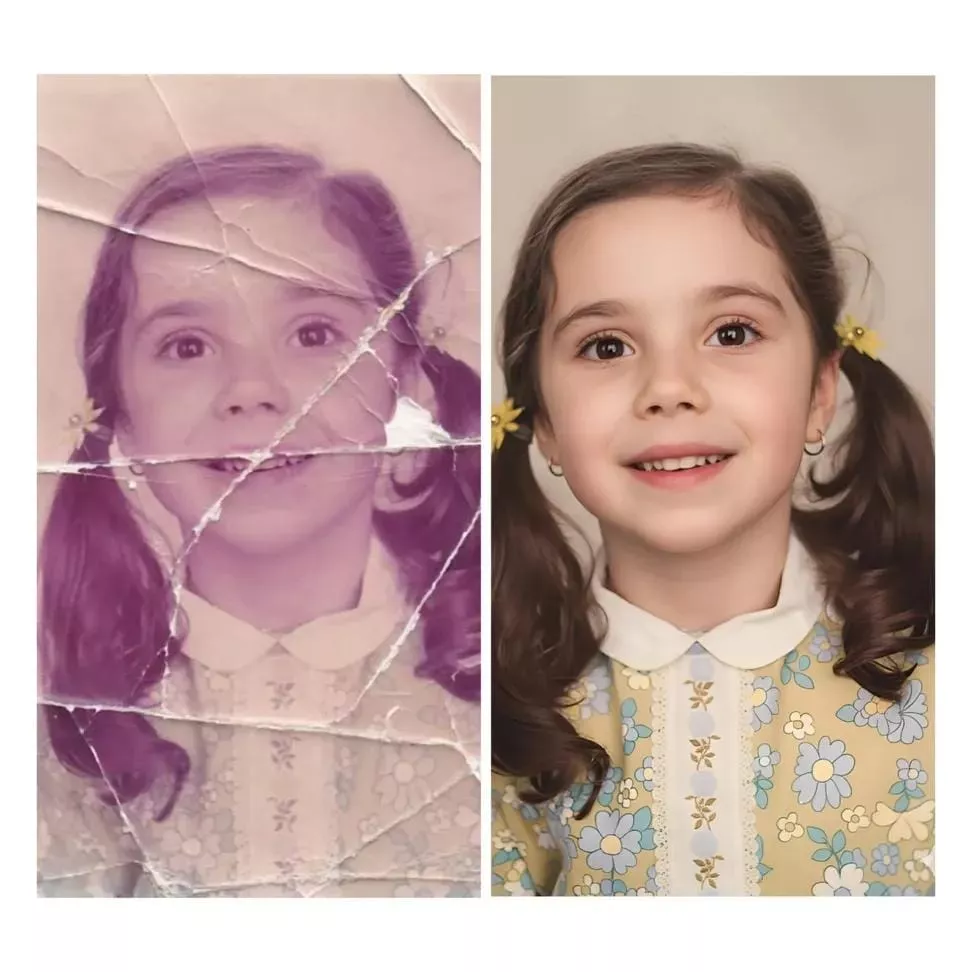
Restore and enhance this damaged photo to a hyper-realistic, ultra-detailed image, 16K DSLR quality. Fix scratches, tears, noise, and blurriness. Enhance colors to vivid, vibrant tones while keeping natural skin tones. Perfectly sharpen details in face, eyes, hair, and clothing. Add realistic lighting, shadows, and depth of field. Photoshop-level professional retouching. High dynamic range, ultra-HD, lifelike textures, cinematic finish, crisp and clean background, fully restored and enhanced version of the original photo.”

4K,Ultra high-resolution photo enhancement and upscaling. Transform this image into a crystal-clear, detailed, realistic quality. Remove noise, blur, grain, scratches, and compression artifacts. Sharpen all important details while keeping natural texture. Restore faded colors, balance exposure, increase clarity and contrast. Improve skin tone and facial features naturally, without altering identity. Repair old damage or missing details. Produce a clean, vibrant, ultra-realistic result.same ratio

lifelike textures, cinematic finish, crisp and clean background, fully restored and enhanced version of the original photo.”
How To Restore Image Into 4K HD
Creating this is incredibly simple. First, scroll down below the image; you will find a “prompt” located there, which you need to copy. You can either use the dedicated “Copy” button provided, or simply select the text manually—highlighting it from the start down to the end—and then use the copy function. Once copied, open a chatbot interface. Among the available options—such as Google Gemini or Google’s own tools—ChatGPT is generally considered the superior choice. Upon opening the interface, you will see various options; select the “Create/Generate” option. Next, upload the old photograph—or whichever image you wish to restore—to transform it into 4K HD quality. After adding the image, paste the prompt you copied earlier into the text field. Once the prompt is pasted, locate the “Generate” button, click it, and submit your request. The process may take a short while—perhaps around a minute—but the results will be absolutely astonishing, transforming your image into true 4K HD resolution. If you find this hard to believe, simply give it a try yourself!
Conclusion
If you are unable to understand the process after reading these paragraphs, please leave a comment below. Once you do, all your doubts will be cleared, and you will then be able to complete this task easily and completely free of charge. If you found our website helpful—even in the slightest—particularly in resolving your issue, please consider supporting us. Thank you for visiting our website.
