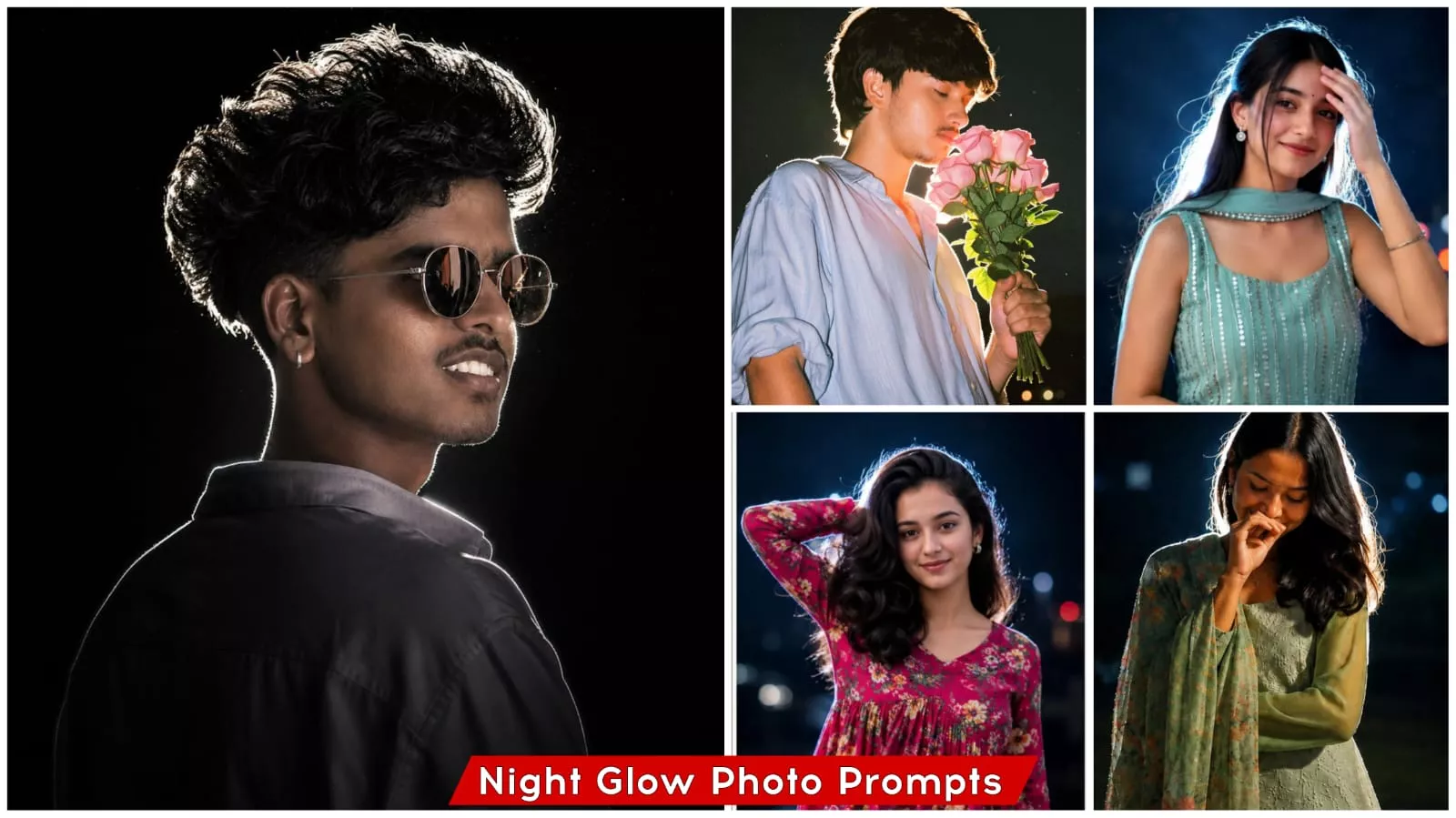
Night Glow Effect Ai Photo Editing Prompts Chatgpt Free Prompts – Friends, when a dark background, a cinematic effect, and an animated light emanating from behind all come together to create a finished image, we refer to this style as “Light Blue Photo Editing.” This editing style produces such a striking cinematic portrait look that it is virtually impossible to dislike the result—as I’m sure you all agree. Just a short while ago, a trend known as “Lo-Fi Desk” emerged. I had previously shared a tutorial for that style as well; in that version, your photo featured a completely dark background with a white light reflecting from behind. While this current style shares some similarities with the Lo-Fi Desk trend, it differs in that the background isn’t entirely pitch-black; instead, the editing creates a “night view” aesthetic. Let me walk you through exactly how to create this photo edit. Let’s dive into the details so you can easily recreate this look without encountering any difficulties or issues. Please read carefully—you will only be able to understand the process if you pay close attention; otherwise, you might find yourself wondering how it’s done. If you prefer to learn through a video tutorial, you can head over to YouTube and search for “Prince Ko Tips.” That is the name of my YouTube channel, where I regularly upload videos and teach you various cool photo editing techniques.
Why Is This Photo Editing Going Viral?
Now that we have covered the photo editing techniques I explained to you—specifically the concepts outlined in the first paragraph, which served as the introduction—let’s explore why this particular style—the “Night Blue Eye” photo editing—is going so viral and why everyone is so obsessed with recreating it. Let me tell you: whenever a photo takes on a cinematic aesthetic, people become incredibly eager to replicate it. You likely feel the same way; if you’ve seen how stunning this photo editing style looks, you are probably searching right now for a tutorial on how to achieve it yourself. The reason is simple: this editing style is so captivating and visually appealing that it inevitably draws everyone in—and it is simply impossible for it not to grab people’s attention.
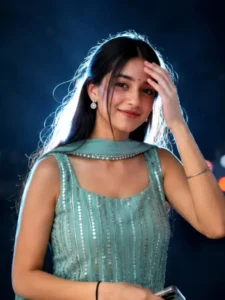
Ultra realistic cinematic night portrait of a person, 100% face match, keep the exact same face, hairstyle, expression, outfit, and natural appearance as the original photo, no unnecessary accessories, no sunglasses unless already present in the original image, dramatic flash photography, strong white rim light glow around hair and shoulders, dark moody nighttime background, high contrast lighting, soft bokeh, realistic skin texture, sharp focus on face, DSLR look, shallow depth of field, cinematic color grading, atmospheric particles, ultra detailed, professional photography, 8k quality, realistic shadows, natural pose, blue-black background, premium portrait look, realistic lighting, preserve original identity and vibe exactly as in source image.
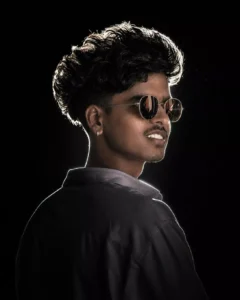
-realistic cinematic dark poster dramatic over-the-shoulder pose of a young man (using the same face as uploaded image), camera positioned slightly behind the shoulder, 90-45 degree side profile facing right, strong rim light outlining the messy textured hair, nose and sharp jawline, deep black background, only the edges of the face glowing with white light, brown round sunglasses with silver rimmed reflecting and face tune and facial skin
Before VS After Feeling
Now, let’s explore the significant differences between a standard photograph and one that has undergone photo editing. As you are likely aware, a typical photo—whether snapped indoors at home or outdoors—often turns out somewhat blurry or lacks a cinematic quality. Furthermore, the background in such images may not always be appealing to you. Photo editing, however, transforms that very same image: it enhances the resolution to HD quality and replaces the original background with one that is visually pleasing—a result so impressive that it is virtually impossible for anyone not to like it. Specifically, this “Night Blue” editing style incorporates a neon-light effect that traces the contours of your body, making the final image look even more cinematic and striking. As I mentioned earlier, the dark background—which is characteristic of nighttime settings—further heightens this cinematic appeal; this is precisely why so many people, upon seeing such images, are inspired to create similar edits themselves.
How To Creat This Photo
So, let’s find out how we can create this specific type of photo edit. We will learn how to do it with absolute ease—and, more importantly, how to ensure that the final result looks truly aesthetic and cinematic. We will cover all of these details right here in this article. So, let’s get started. First, you need to open the ChatGPT application. Once opened, you will see a specific interface; look for the “Create Image” button and click on it. After selecting the “Create Image” option, you will see a plus (+) icon; click on it to reveal various options—such as using your camera or uploading from your photo library. You can then select and upload a high-quality photo of your choice, or even a selfie. Once you have selected your image, simply paste the prompt that we have provided here. I have made a dedicated effort to curate an excellent prompt on my website; simply copy that exact prompt, paste it into the application, and hit “Generate.” Within a short while, your result will be ready.