Viral Motion Clone Ai Photo Editing Prompts – If you use social media then you will know. You can create it with the help of a photo editing called Motion Clone which is becoming very viral and that too for free without paying any money to anyone. You can create this photo and everyone is showing the photo but is not giving the prompt so I am going to give you the prompt in this article and will also give all the details about it. How it is made and why it is going viral. I will tell you everything. If you also create this photo editing then your photo will also look absolutely aesthetic and the result of your photo creation will also be very amazing. If you see it then you will say that this has not been made by any editor. So let us know about this photo editing in detail.
What is Motion Clone AI Photo Editing?
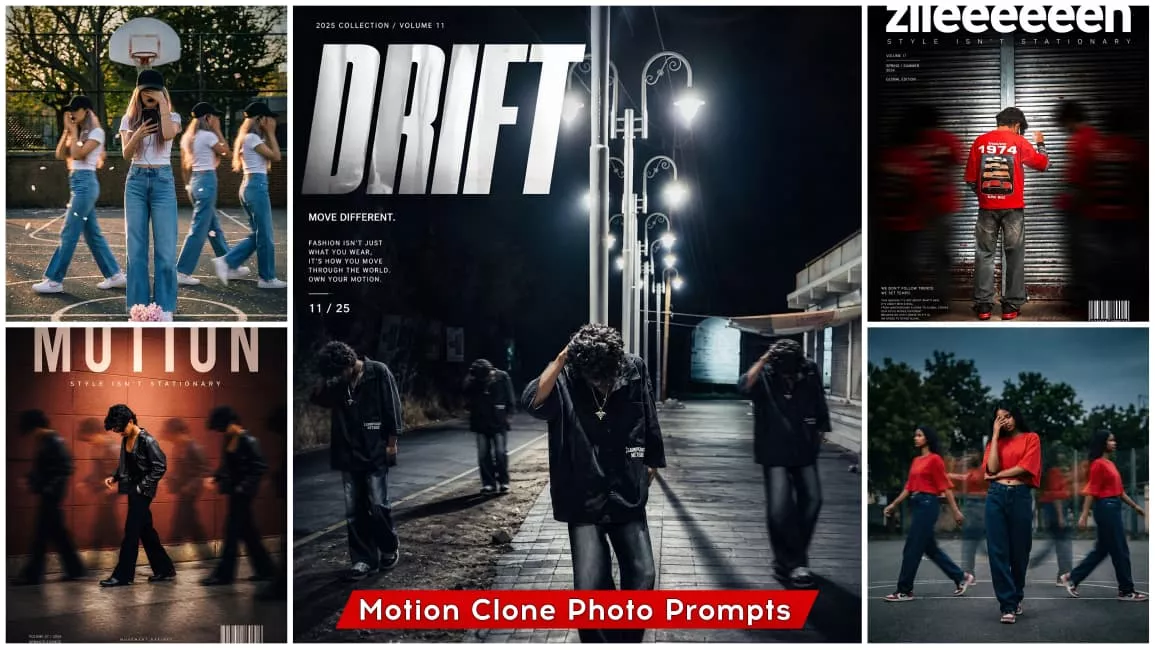
We understand what “Motion Clone” entails in photo editing—how it works and what exactly constitutes a “motion-controlled” photo. Let me explain: this is a specific style of photo editing—an AI-assisted technique—that allows you to transform your images to resemble the Motion Clone aesthetic. Just like the example I used in the thumbnail, your own photos will be processed and ready in that exact style. Furthermore, this entire editing process is powered by AI; it does not require the assistance of a manual editor and is provided completely free of charge—at absolutely no cost. So, let’s dive deeper into what happens within a Motion Clone photo. Essentially, the composition features your primary, full-detail photograph alongside two or three “clones” of yourself, which appear in a blurred, motion-trail style positioned to your sides. Additionally, a large, prominent “Motion” text overlay is typically displayed at the top of the image. The result is incredibly beautiful and aesthetically pleasing; it lends a distinct, edgy, and “mafia-style” vibe to the image—a look so appealing that anyone would be eager to create it for themselves.
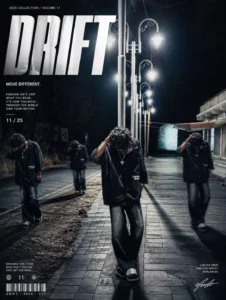
A cinematic streetwear photoshoot of a teenage boy standing on an outdoor basketball court,don't change out fit, face, head slightly down covering face with hand, natural pose, multiple motion clones of the same person walking around him creating a motion blur effect, dramatic lighting, dark moody sky, high contrast, sharp focus on main subject, depth of field, fashion editorial style, urban environment, trees in background, realistic shadows,
4k ultra realistic, nike style campaign, poster design.
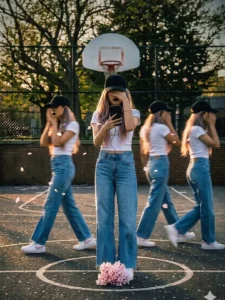
streetwear editorial poster. Keep my face, body, pose, outfit, and original background recognizable, but enhance everything into a luxury fashion campaign aesthetic. Add 4 realistic duplicate versions of me across the frame placed naturally like motion-captured walk sequences. Keep the main/front version largest, sharpest, and most detailed, while side clones are slightly faded or motion blurred. Use dramatic overhead lighting with a subtle glow, deep shadows, long floor shadows, cool-toned cinematic color grading, strong contrast, glossy highlights, and soft film grain. Make the outfit textures crisp and premium. Add bold oversized magazine-style typography in the top corner with one powerful word related to movement or style

(example:

MOTION, STATIC, RUSH, ECHO). Include smaller minimal text such as collection year, slogan, barcode, or campaign details.
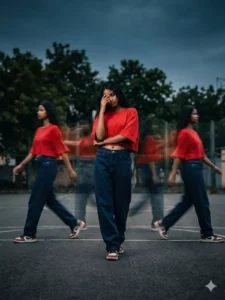
A cinematic streetwear photoshoot of a teenage girl standing on an outdoor basketball court, outfit a oversized red crop top and dark blue baggy Jean's, don't change face,, head slightly down covering face with hand, natural pose, multiple motion clones of the same person walking around him creating a motion blur effect, dramatic lighting, dark moody sky, high contrast, sharp focus on main subject, depth of field, fashion editorial style, urban environment, trees in background, realistic shadows, 4k ultra realistic, nike style campaignstreetwear editorial poster. Keep my face, body, pose, outfit, and original background recognizable, but enhance everything into a luxury fashion campaign aesthetic. Add 4 realistic duplicate versions of me across the frame placed naturally like motion-captured walk sequences. Keep the main/front version largest, sharpest, and most detailed, while side clones are slightly faded or motion blurred. Use dramatic overhead lighting with a subtle glow, deep shadows, long floor shadows, cool-toned cinematic color grading, strong contrast, glossy highlights, and soft film grain. Make the outfit textures crisp and premium. Add bold oversized magazine-style typography in the top corner with one powerful word related to movement or style

(example:

MOTION, STATIC, RUSH, ECHO). Include smaller minimal text such as collection year, slogan, barcode, or campaign details.
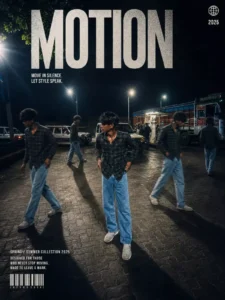
Transform my photo into a high-end cinematic streetwear follow and commer editorial poster. Keep my face, body, pose, outfit, and original background recognizable, but enhance everything into a luxury fashion campaign aesthetic. Add 4 realistic duplicate versions of me across the frame placed naturally like motion-captured walk sequences. Keep the main/front version largest, sharpest, and most detailed, while side clones are slightly faded or motion blurred. Use dramatic overhead lighting with a subtle glow, deep shadows, long floor shadows, cool-toned cinematic color grading, strong contrast, glossy highlights, and soft film grain. Make the outfit textures crisp and premium. Add bold oversized magazine-style typography in the top corner with on8.4K powerful word related to movement or style (example: MOTION, STATIC, RUSH, ECHO). Include smaller minimal tex such as collection year, slogan, barcode, or campaign details.
Best Ai Tool App To Creat Motion Clone Photo
Let me introduce you to the best tools and resources available—the absolute best options—to ensure that the photos you create are of the highest possible quality. The first question that arises is: which application should you use? To generate this specific type of image, we can utilize two applications that are renowned specifically for their image-creation capabilities: Google Gemini and ChatGPT. You have likely encountered examples of images generated by Google Gemini and ChatGPT frequently across social media platforms; indeed, it is through these very applications that images are created and subsequently go viral on Instagram. This particular style of photo editing is consistently trending and going viral. What makes this specific type of photo editing so remarkable—and why does it achieve such widespread virality? The reason these images are becoming so exceptionally popular is that they resonate deeply with people; they possess a distinct aesthetic appeal and exude a cinematic vibe that leaves everyone eager to create their own versions.
How To Creat This Photo
Now comes the final step. How do you create this image so that your photo takes on a cinematic look and yields excellent results? Let me explain the process. First, you need to open the ChatGPT application. I have provided several prompts here; simply copy the prompt corresponding to whichever image in this article appeals to you most. Once copied, navigate to Google or ChatGPT, paste the prompt, upload one of your own photos, and hit “Generate.” Within moments, your photo will be transformed into an aesthetic and cinematic masterpiece. For the best outcome, I highly recommend uploading a high-definition (HD) image; since high-quality input yields high-quality output, maintaining good image quality ensures that the final generated result will be truly impressive. Additionally, our website features a wide variety of other prompts; feel free to browse through them and copy any that catch your eye. Each prompt is conveniently located directly beneath its corresponding sample image, allowing you to easily copy and utilize them for your own creations.