Double Exposure Ai Photo Editing Prompts Chat Gpt New Prompts – Friends, the topic I am about to share with you today—the content I am presenting—is currently trending significantly. Since summer vacations are currently underway, many of you have likely gone traveling. That is precisely why I am demonstrating this travel-themed photo editing tutorial today. If you have indeed gone on a trip, you can use these techniques to give your vacation photos a cinematic look or transform them into luxurious-style images. So, let’s dive into all the details regarding this process in this video. Without further ado, let’s get started. First, we will cover everything in this article and clarify any doubts you may have. If, by any chance, something remains unclear to you, you can re-read the article to gain a better understanding. Furthermore, if you still face difficulties even after doing so, feel free to leave a comment asking for assistance; we will be happy to help clear up your doubts.
Details Of travel Ai Photo Editing
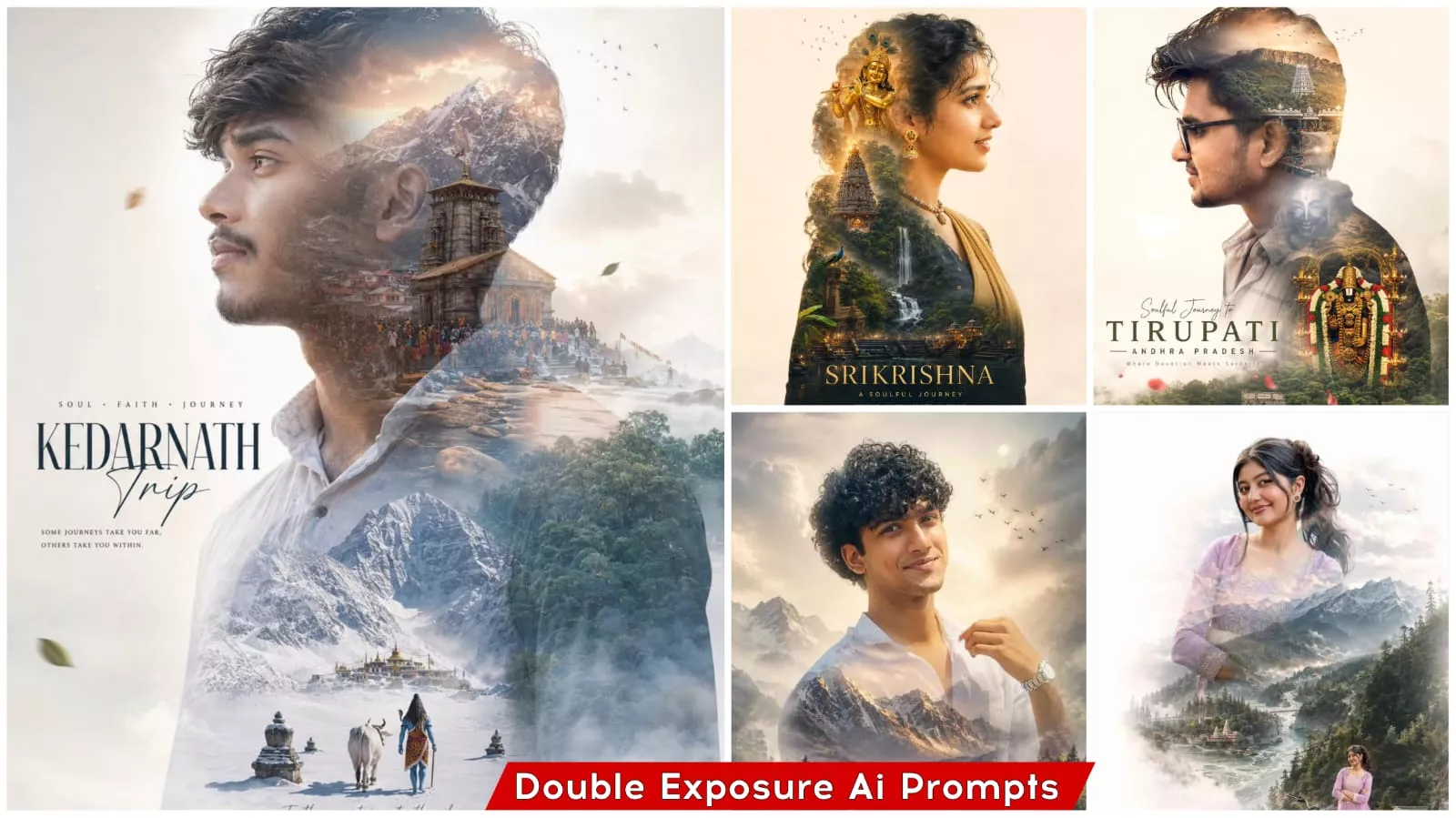
Let me explain what “travel-style” photo editing entails—what makes it unique and how the process works. Essentially, this editing style requires a photograph of you at the specific travel destination you are visiting. Once you have that photo, it is superimposed onto an image featuring the location’s most famous landmarks or attractions. Typically, text is added against a white background, and your own photo is positioned both at the top and the bottom of the frame—creating a visually striking and impressive effect. I have already displayed a sample image at the very beginning so you can see exactly what the final result looks like and just how stunning it is. People are currently going crazy trying to create these images; if you create one yourself and upload it to any platform, your chances of going viral will increase significantly.
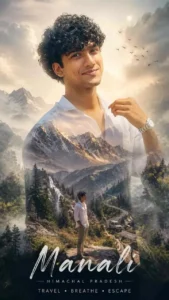
Create a cinematic double-exposure travel poster for “Manali, Himachal” using my uploaded photo. Keep the same face, pose, outfit, sunglasses, and natural features unchanged. Blend Himalayan valleys, pine forests, misty mountains, winding roads, rivers, and clouds inside the portrait silhouette. Add a small full-body version beside a scooter/bike on a mountain road. Style: luxury Himalayan tourism campaign, dreamy matte tones, soft fog, atmospheric depth, realistic blending, minimal typography, clean white background, ultra-realistic editorial aesthetic. Text: “Manali”. “Himachal”. “TRAVEL• BREATHE• ESCAPE”
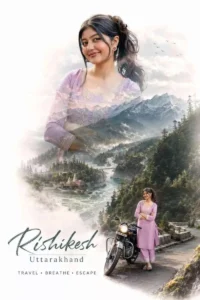
Create a cinematic double-exposure travel poster for “Rishikesh, Uttarakhand” using my uploaded photo. Keep the same face, pose, outfit, and natural features unchanged. Blend Himalayan valleys, pine forests, misty mountains, winding roads, rivers, and clouds inside the portrait silhouette. Add a small full-body version beside a bike on a mountain road. Style: luxury Himalayan tourism campaign, dreamy matte tones, soft fog, atmospheric depth, realistic blending, minimal typography, clean white background, ultra-realistic editorial aesthetic. Text. “Rishikesh” “Uttarakhand”. “TRAVEL • BREATHE • ESCAPE” don’t change face
Best Application for Travel Ai Photo Editing
Now, let’s explore the best applications! These tools allow us to perform photo editing with great ease, and creating these edits doesn’t require any specialized or obscure software. Popular choices in this category include CapCut, VN, and Lightroom. Additionally, we need applications that allow us to generate images simply by entering text prompts; for this purpose, Google Gemini and ChatGPT are excellent options. Among these, ChatGPT stands out as the best choice, as it is renowned specifically for image generation—a feature utilized by countless users. You may or may not be familiar with how this image generation process works; however, many of you likely already know, given that numerous trending photos have been created using this very method (as well as via Google Gemini). If you are unsure how to create them, I have provided instructions below in the next article, which will make the process clear and enable you to create your own images with ease. Furthermore, if you prefer to learn through video tutorials, you can search for our channel on Google; I regularly upload videos there, from which you can learn the techniques.
How To Creat Photo
Now that we know how to create this type of photo edit, you will find that the process is extremely simple and requires very little effort on your part. To get started, simply open any chat-based application and upload the travel photo you wish to edit. You can also specify the name of the location in the accompanying text. Once you upload the image and submit the prompt—including the location details—the application will quickly generate an edited version of your photo. In this way, you can very easily create your own edited photos.