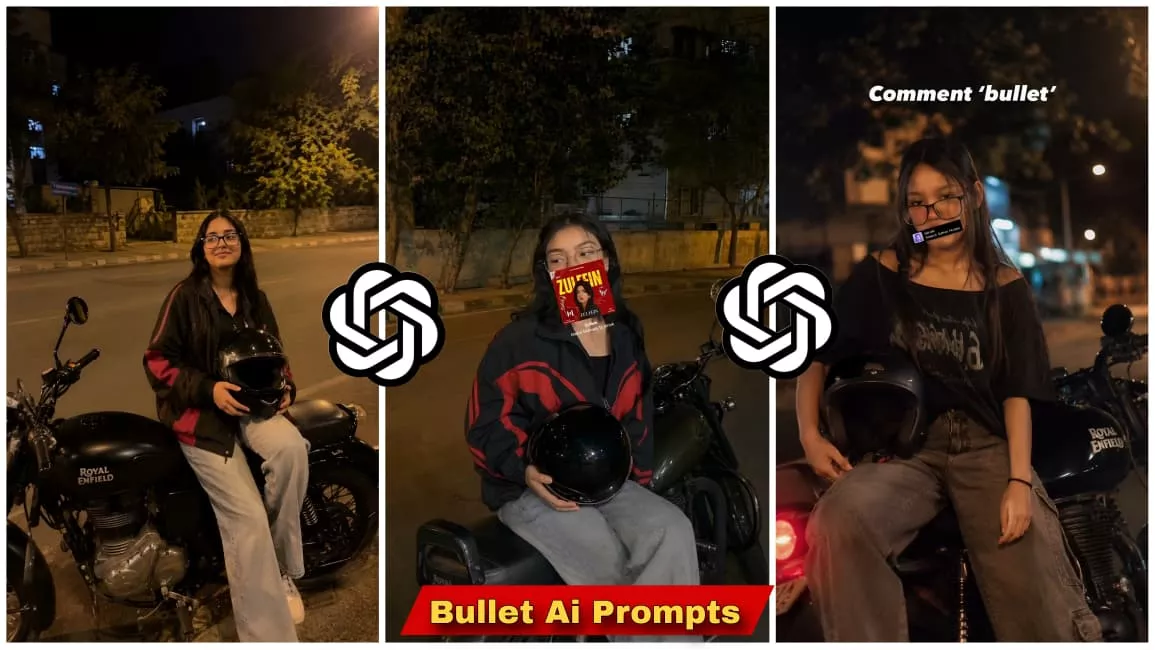
Chat Gpt Bullet Ai Photo Editing Prompts New Ai Prompts – Friends, you are all aware of how trending “Bullet” (motorcycle) photo editing has become these days. You likely know just how popular this style is and how many die-hard fans of the Bullet motorcycle exist worldwide; everyone loves it and wishes they owned one. For those who don’t actually own the bike, this photo editing technique offers a way to fulfill that desire by digitally adding a Bullet to their photos. You, too, can easily create these Bullet-themed edits. Let’s look at how to create this cinematic look: it’s quite simple—you just need a specific prompt (which I have provided). Simply copy that prompt, paste it into Google Gemini or ChatGPT, upload your image, and generate the photo. Once you blend in the Bullet effect, the result is a stunning, cinematic image. Just try it out and see the amazing results for yourself.
Why Is This Photo Going Viral?
Why Is This Photo Going Viral Now we know why this photo editing style is going so viral. The reason is the immense craze for the Bullet motorcycle; it is currently trending and universally loved because it appeals to everyone. In Instagram Reels, the Bullet looks incredibly aesthetic and cinematic—it’s simply stunning. Furthermore, the Bullet is frequently featured in movie posters and films, which has further fueled this craze. Everyone wants to create photos with a Bullet. This specific “action-edited” trend is going viral precisely because of this obsession; without the craze for the Bullet, this trend wouldn’t be taking off like this. You, too, can easily make this go viral—it doesn’t require much effort, and doing so can be very beneficial for you.
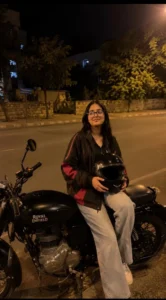
REALISTIC OUTDOOR NIGHTTIME HANDHELD SMARTPHONE PHOTO OF THE WOMAN FROM PHOTO 1. USE PHOTO 1 AS FACE AND HAIR REFERENCE.

RECREATE HER IN THE EXACT POSE, BIKE, LIGHTING, OUTFIT, AND BACKGROUND OF PHOTO 2.

SHE IS SITTING SIDEWAYS ON A BLACK ROYAL ENFIELD CLASSIC PARKED ON A ROADSIDE AT NIGHT, HOLDING A BLACK SHINY HELMET WITH BOTH HANDS, LOOKING SLIGHTLY AWAY FROM THE CAMERA WITH A SOFT NATURAL SMILE.

KEEP HER REAL FACIAL FEATURES, SKIN TONE, FACE SHAPE, AND LONG OPEN BLACK HAIR EXACTLY LIKE PHOTO 1.

NATURAL FACE BLENDING, REALISTIC PROPORTIONS.

OUTFIT: BLACK AND RED OVERSIZED TRACK JACKET, BLACK INNER TOP, LIGHT GRAY BAGGY JEANS.

WARM STREETLIGHT GLOW, CINEMATIC NIGHT AMBIENCE, TREES AND BUILDING IN BACKGROUND, NATURAL SHADOWS, REALISTIC REFLECTIONS.

ULTRA-REALISTIC SMARTPHONE PHOTO, CANDID INSTAGRAM STYLE, PHOTOREALISTIC, NATURAL SKIN TEXTURE, NO AI LOOK, NO BEAUTY FILTER, 9:16 VERTICAL.
Main Elements Of Bullet Editing
Main Elements Of Bullet Editing I am explaining the key elements involved in this photo editing process. First is “subject placement”—determining exactly where the subject is positioned and the nature of the setting. We chose a location—specifically a night-time street or highway—to create a cinematic vibe that helps the image go viral. Second is the “motion blur” effect; the tool generates this automatically and seamlessly integrates it into the image. Third is the “cinematic setup”; the process naturally produces a cinematic look because we specify this in the prompt—instructing the AI to create the image with cinematic effects. Fourth is “dynamic lighting”; the tool adds this automatically, which significantly boosts the image’s viral potential. You don’t need to specifically request these dynamic effects, as everything is handled through the initial prompt. These are the key elements that make it work so well.
How To Create Photo With Bullet Ai Photo Editing Prompts
How To Create Photo I’ve already covered most of the basics. Now, let’s look at how to create these edited photos. First, you need to open ChatGPT. You might be wondering why we’re using ChatGPT instead of another app; well, it’s famous for image generation, it’s currently going viral, and everyone is using it to create these photos. Since we want to keep up with the trends, we’ll use this app too. Once you open it, click the plus icon to upload your photo, then copy a prompt from our website and paste it there. Hit generate, and your photo is ready. The result looks so aesthetic and cinematic that you wouldn’t even guess it was created by AI. In the past, you would have had to pay editors to create this kind of imagery, but in the age of AI, you don’t have to pay anyone anything.